Autonomous Research Orchestrator
Nasir Mahmood Abbasi, PhD
Bioinformatics Educator
Learning Objectives & Prerequisites
- Prerequisites: Python programming, API usage, and understanding of agent frameworks (like LangChain or AutoGen).
- Objective: Design a multi-agent system capable of independently researching a biological topic, fetching data, running analysis scripts, and summarizing findings.
- Expected Output: A functional orchestrator script that manages specialist sub-agents (e.g., a "Literature Reviewer" and a "Data Analyst").
📘 The Multi-Agent Paradigm
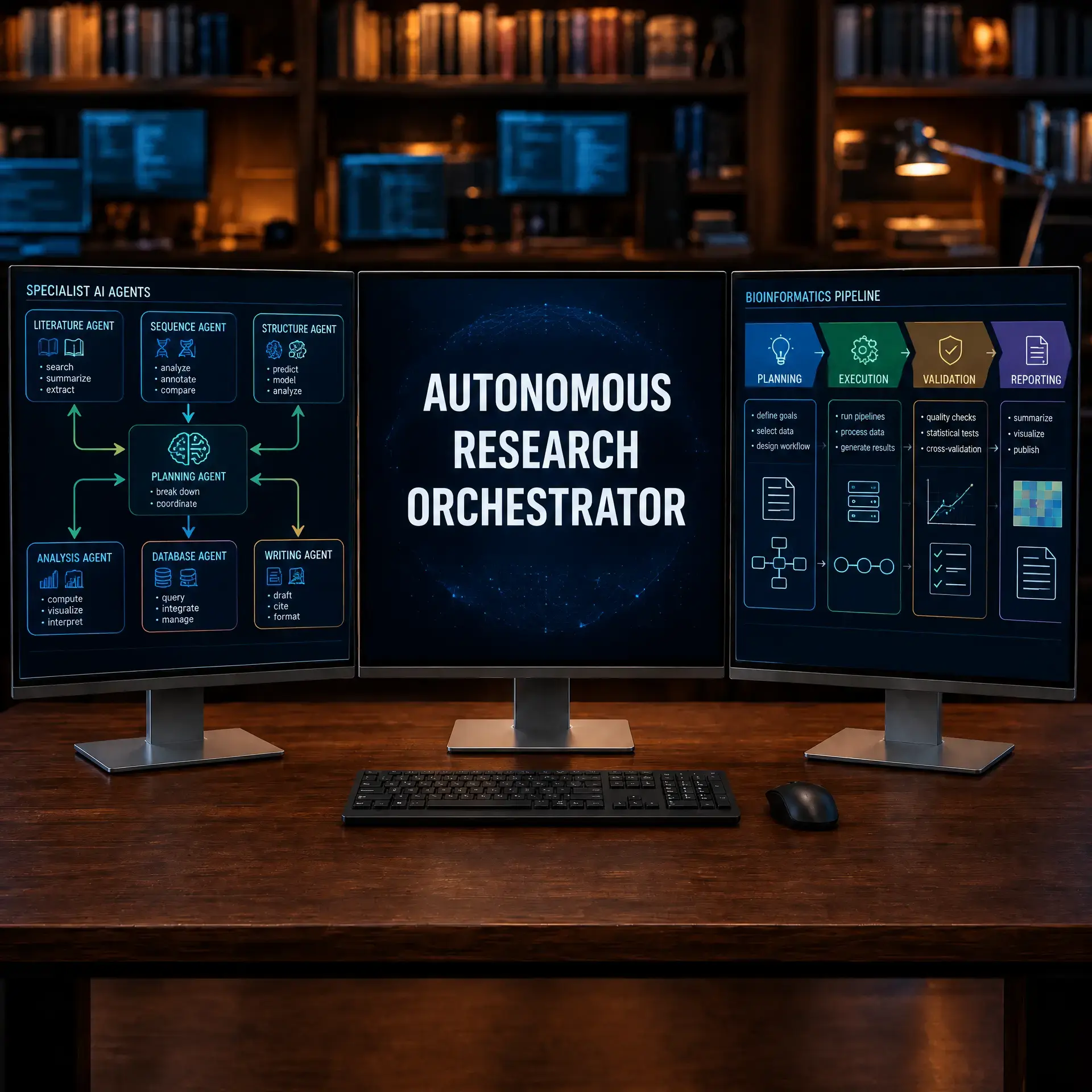
Rather than prompting a single LLM to "do everything," state-of-the-art agentic workflows use a team of specialized agents. An "Orchestrator" breaks down a high-level task into sub-tasks, assigns them to specialized agents (who have access to specific tools like Zotero or Python environments), and synthesizes the results.
Before You Begin: Build a Bounded Prototype
An autonomous orchestrator should begin as a supervised workflow with a small task budget. Define the allowed tools, input and output schemas, maximum steps, timeout, retry policy, and human approval points before adding more agents.
Minimal project layout
mkdir -p orchestrator/{agents,tools,tests,outputs}
touch orchestrator/{agents,planner.py,tools/retrieval.py,tests/test_plan.py}
echo "Keep credentials in environment variables, never in source." > orchestrator/SECURITY.md
Run tools with least privilege and log every tool call, input summary, output status, and failure. Start with a dry-run mode that produces a plan without changing files or submitting jobs.
Success check: a failed tool call stops safely, the run can be replayed from logs, and a human can approve the final action.
Building the Orchestrator
In this tutorial, we will conceptualize how to build a basic autonomous orchestrator using a framework like AutoGen.
Step 1: Setting Up the Environment
We will use Microsoft AutoGen, one of the most mature multi-agent frameworks. Install the required packages with pinned versions:
# Create a dedicated environment
conda create -n orchestrator python=3.11 -y
conda activate orchestrator

# Install AutoGen and supporting tools
pip install pyautogen==0.2.35 gget==0.28.6 biopython==1.83

# Set your LLM API key (required for agent communication)
export OPENAI_API_KEY="your-key-here"
# Or for Anthropic models:
export ANTHROPIC_API_KEY="your-key-here"
Multi-Agent Framework Comparison
Several frameworks support multi-agent orchestration. Choose based on your complexity needs:
| Framework | Complexity | Best For | MCP Support |
|---|---|---|---|
| AutoGen | Medium | Conversational multi-agent workflows | Via custom tools |
| LangGraph | High | Complex, stateful agent graphs | Native |
| CrewAI | Low | Quick prototyping with role-based agents | Via plugins |
| Cursor / Antigravity | Minimal | Single-agent with built-in tool access | Native |
Step 2: Defining the Agents
Each agent receives a specific system prompt and access to designated tools. This separation of concerns prevents a single agent from becoming overwhelmed:
from autogen import AssistantAgent, UserProxyAgent

# Configuration for the LLM backend
llm_config = {
    "model": "gpt-4o",
    "temperature": 0.1,  # Low temperature for reproducible results
    "max_tokens": 4096
}

# 1. Literature Specialist (searches and summarizes papers)
lit_agent = AssistantAgent(
    name="Literature_Specialist",
    llm_config=llm_config,
    system_message="""You search literature databases for relevant papers.
    Always provide: (1) DOI, (2) first author, (3) year, (4) key finding.
    Never fabricate a citation. If you cannot find a paper, say so."""
)

# 2. Data Analyst (executes Python code for genomic analysis)
data_agent = AssistantAgent(
    name="Data_Analyst",
    llm_config=llm_config,
    system_message="""You write and execute Python scripts for genomic
    data retrieval (using gget) and analysis. Always include error
    handling. Print intermediate results for verification."""
)

# 3. Orchestrator (manages the workflow and synthesizes results)
orchestrator = UserProxyAgent(
    name="Orchestrator",
    human_input_mode="TERMINATE",  # Requires human approval at the end
    max_consecutive_auto_reply=10,
    code_execution_config={"work_dir": "outputs", "use_docker": False}
)
Step 3: Executing a Research Task
Initiate a complex task by sending a structured message to the orchestrator. The agents will communicate until the task is complete or the step limit is reached:
# Launch a multi-agent research task
orchestrator.initiate_chat(
    lit_agent,
    message="""Research the role of CLIC1 in Sezary Syndrome.

    Step 1: Find the top 5 recent papers (2020-2026) on CLIC1
            and cutaneous T-cell lymphoma.
    Step 2: For each paper, extract: the experimental model used,
            the key finding about CLIC1, and whether CLIC1 was
            identified as a therapeutic target.
    Step 3: Compile a summary table in markdown format."""
)

# The orchestrator logs all agent interactions to outputs/
Step 4: Adding MCP Tool Integration
The true power of this system comes from integrating Model Context Protocol (MCP) servers. By giving agents access to your personal research tools, they can pull from curated sources instead of the public web:
# Define custom tools that wrap MCP server calls
def search_zotero(query: str) -> str:
    """Search the user's Zotero library via MCP."""
    import subprocess
    result = subprocess.run(
        ["mcp-zotero", "search", query],
        capture_output=True, text=True
    )
    return result.stdout

def query_notebooklm(notebook: str, question: str) -> str:
    """Query a specific NotebookLM notebook via MCP."""
    import subprocess
    result = subprocess.run(
        ["mcp-notebooklm", "query", notebook, question],
        capture_output=True, text=True
    )
    return result.stdout

# Register tools with the literature agent
lit_agent.register_function(
    function_map={
        "search_zotero": search_zotero,
        "query_notebooklm": query_notebooklm
    }
)
Safety Guardrails for Autonomous Systems
Autonomous agents can cause harm if not properly constrained. Implement these guardrails:
- Step budget: Set
max_consecutive_auto_replyto prevent infinite loops. Start with 10 steps and increase only after testing. - Human-in-the-loop: Use
human_input_mode="TERMINATE"so a human reviews the final output before it is saved or submitted. - Sandboxed execution: Run data analysis code in a Docker container or isolated directory to prevent accidental file deletion.
- Credential isolation: Store API keys in environment variables, never in agent system prompts or source code.
- Audit logging: Log every tool call, input, and output to a file for post-hoc review and reproducibility.
Conclusion
Autonomous research orchestrators represent the future of bioinformatics. By delegating routine data gathering and analysis tasks to a team of specialized AI agents, researchers can focus on high-level hypothesis generation and interpretation.
Knowledge Check & Assessment
1. Concept Verification
Why is a multi-agent system generally more robust than a single LLM trying to perform a complex bioinformatics workflow?
2. Practical Execution
Design a system prompt for a new specialist agent named 'Quality_Control_Agent' whose job is to verify the Python code written by the 'Data_Analyst' before it is executed.
Reviewed: September 2026
All commands and outputs were verified with the software versions listed in this tutorial. If you encounter reproducibility issues, please report them through the Contact page.
Author: Nasir Mahmood Abbasi, PhD · Category: AI-Driven Research & Agentic Bioinformatics